In Zed, you can use the Git Panel menu to display staged and unstaged changes separately.
In short, it gives you a Git workflow similar to VS Code.
The feature was merged only about two months ago and doesn't seem to be widely known yet, so I put together a quick guide on how to enable it and how it came to be added.
Separating the File List
Open the display settings in the top-right corner of the Git Panel, then select Staged & Unstaged under Group By.
(I believe the default is Tracked & Untracked.)
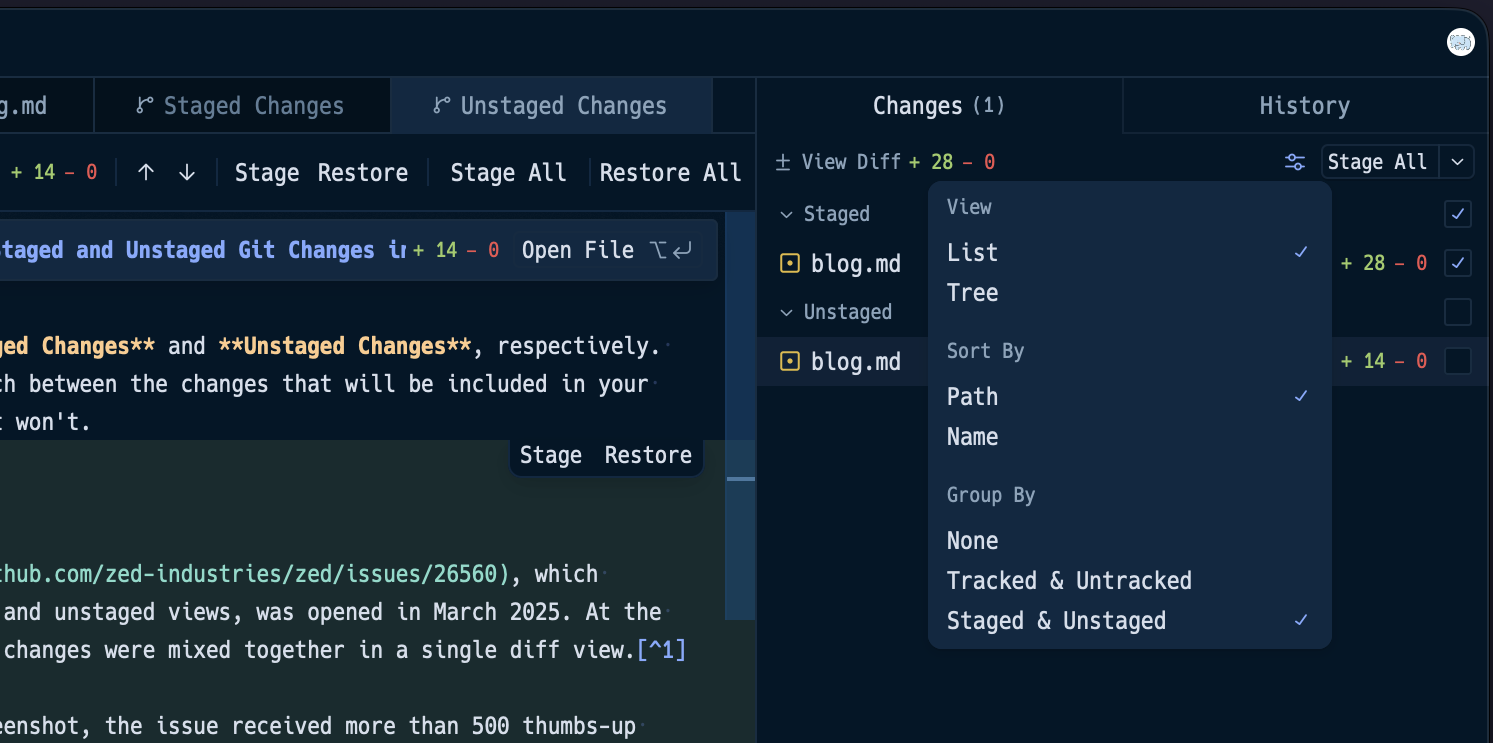
The file list will now be separated into Staged and Unstaged sections.
Files that are only partially staged will appear in both sections.
Separating the Diff Views
You can also open staged and unstaged diffs in separate tabs from the command palette.
git: view staged changesgit: view unstaged changes
These commands open Staged Changes and Unstaged Changes, respectively. This lets you easily switch between the changes that will be included in your next commit and those that won't.
When Was This Added?
Issue #26560, which requested separate staged and unstaged views, was opened in March 2025. At the time, staged and unstaged changes were mixed together in a single diff view.[^1]
As you can see in the screenshot, the issue received more than 500 thumbs-up reactions alone. It was clearly a feature people around the world had been waiting for. 🌏

PR #46541 was merged on July 7, 2026, adding dedicated Staged Changes and Unstaged Changes views in Zed 1.11.3.
Grouping files in the Git Panel was implemented separately in PR #59884. It was merged on July 11 of the same year and released in Zed 1.12.0.
Both features were added in July 2026. If you've been wishing Zed would let you view staged and unstaged changes separately, check out the menu in the top-right corner of the Git Panel!
[^1]: A Discussion #26862 from around the same time also requested a VS Code-like way to list and review staged and unstaged changes separately.
About the author
- Brave New Elephant
Comments
Join the discussionNo comments yet. Be the first to comment.